Prudential's Corporate Technology organization forecasts ~$400M in annual software spend across ~1,400 contracts. When Relationship Managers needed to change the forecast - redirect a cost center, cancel a service, adjust seat count - there was no native way to request it. They exported to Excel, annotated a comments column, and emailed the Planning & Analysis team.
Goal:
Replace scattered email and Excel change requests with a built-in, contextualized workflow.
Measure:
Change request efficiency rating, and time saved.
Result:
~21 hours saved per Relationship Manager per forecasting cycle, and RM efficiency rating improved from 1 to 3+ out of 5.
I designed a native change request workflow to replace the email-and-Excel process with a structured, trackable system that ties every request directly to its data.

Finance Relationship Managers (RMs) at Prudential review actuals from last year detailing software services used, and select the line items that they want to request changes on for their upcoming software spend forecast.
They then write the change they need, select the type of change, and hit submit to send the request to the Planning and Analysis (P&A) team to action.
They go into their 'change requests' tab to look at which ones are in drafts, submitted, in progress, and done. In drafts, RMs can add or remove line items over time, and proceed to submit when they're ready.
$400M in software spend forecasted through Excel exports in emails.
Every year, Prudential's Corporate Technology organization forecasts approximately $400M in annual software spend across ~1,400 contracts.
Stakeholders | Their Role |
|---|---|
Relationship Managers | Director-level finance partners who evaluate what software is needed, what makes financial sense, and what to renew, cut, or redirect. |
Planning & Analysis team | Maintains the forecast data, executes changes, and ensures the numbers are accurate. |
Budget Owners | The people whose teams use the software — they tell Relationship Managers what they need |
Budget Owners tell Relationship Managers what they need. Relationship Managers advise on whether it fits the budget. Once aligned, the Planning & Analysis team actions the changes. That overall structure worked well but the actual execution was manual and time-consuming.
When a Relationship Manager spotted a change- a cost center to redirect, a service to cancel, seats to adjust- they exported the relevant line items from PowerBI to Excel, created a comments column, added their requests in it, and emailed the sheet to the Planning & Analysis team. TP&A would respond with a follow-up question, or confirm that the change was made. To verify it was done correctly, RMs scanned the updated data on PowerBI line by line, cross-referencing their Excel sheet. And when the next change came up, the whole cycle started over with the history of every request scattered across email threads and spreadsheets.
The business problem
~285 messages per forecast cycle | Each RM sends 4–5 change request emails per cycle, each generating ~2 follow-ups. Across 21 RMs, that's ~285 messages with no priority signal and no unified queue. |
2 channels to monitor | 70% email, 30% Teams. No standardized path. |
~$44,000 in logistics per forecast cycle | RMs spend ~12 hours/month exporting, annotating, emailing, and verifying - work well below the strategic role they're hired for. |
90% of Relationship Managers rated the change request process a 1 out of 5 - the least efficient, lowest value work they do
7 user interviews and a survey of all 21 Relationship Managers revealed a stalemate: the Planning & Analysis team believed Relationship Managers should own the forecast in detail. Relationship Managers believed the Planning & Analysis team should own it.
Speaking directly with Relationship Managers revealed something more specific. The work they resented wasn't the financial judgment - it was the logistics. One Relationship Manager spent two months of nights and weekends on a single forecast cycle. Another said: "I do a lot that's not using my value. One day we're data entry people. One day we're doing reconciliation."
The real insight: the tool was asking them to be messengers when they saw themselves as advisors. The logistics needed to be handled by the tool - not by people.
Current UX pain points
Pain point | How pressing the pain was |
|---|---|
No native way to request a change | 90% rated change request submission a 1 out of 5 |
No visibility into request status | 90% rated change request submission a 1 out of 5 |
No audit trail | 86% rated difficulty of verifying changes at a 4 out of 5 |
One-off changes restart the process | 95% said one-off requests were a significant source of back-and-forth |
No efficient path for bulk requests | RMs managing hundreds of line items had no way to group related changes |
Defining the challenge
User needs
Submit, track, and verify change requests without leaving the tool. Reduce back-and-forth communication. Support bulk change requests across multiple line items.
Business goals
Replace emails and follow-ups with a built-in contextualized flow. Free Relationship Managers for strategic, advisory work.
Engineering needs
React-based web app built from scratch, no existing design system. Reusable components needed- the Software forecast is the pilot and informs how other forecast tools solve the same problem.
Challenges translated to design goals
Pain point | Design goal | Design specifics |
|---|---|---|
Manually exporting to request a change | Make change requests native | Submit directly on the line item- no Excel, no email |
No visibility into status | Make status visible | Every request shows Drafts, In Progress, Submitted, or Done |
No audit trail | Show change history | Every request logged and visible at the line item level |
One-off changes restart everything | Streamline the change request flow, so even 1 new request becomes easy. | Submit individual requests without restarting a cycle |
Bulk changes require manual review of individual line items | Enable bulk actions | Select multiple line items, one modal, one submission, one review |
Requests arrive without context | Structured request modal | Modal prompts for required context upfront |
Three design directions for simplifying the change request process
Direction 1: Request-First Model
A dedicated "New Request" flow separate from the data table. RMs fill out a form and manually reference line items. Pros: Familiar, low learning curve. Cons: Data and requests disconnected — no indication on the line item that a request exists.
Direction 2: Inline Editing Model
Change requests submitted directly on the row without a modal. Pros: Fastest interaction, familiar to Excel users. Cons: Cluttered on a dense table, no space for context, communication, or history; bulk requests have no home.
Direction 3: Data-First Model (Selected)
Every line item is the entry point. Opening a line item shows its data alongside all associated requests, history, and communication in one place. Pros: Data and requests always connected; full history at the line item level; scales to bulk requests; drafts capture intent before all info is available. Cons: More clicks than inline for simple changes.
Iteration 1: Highlight line items with in-progress change requests
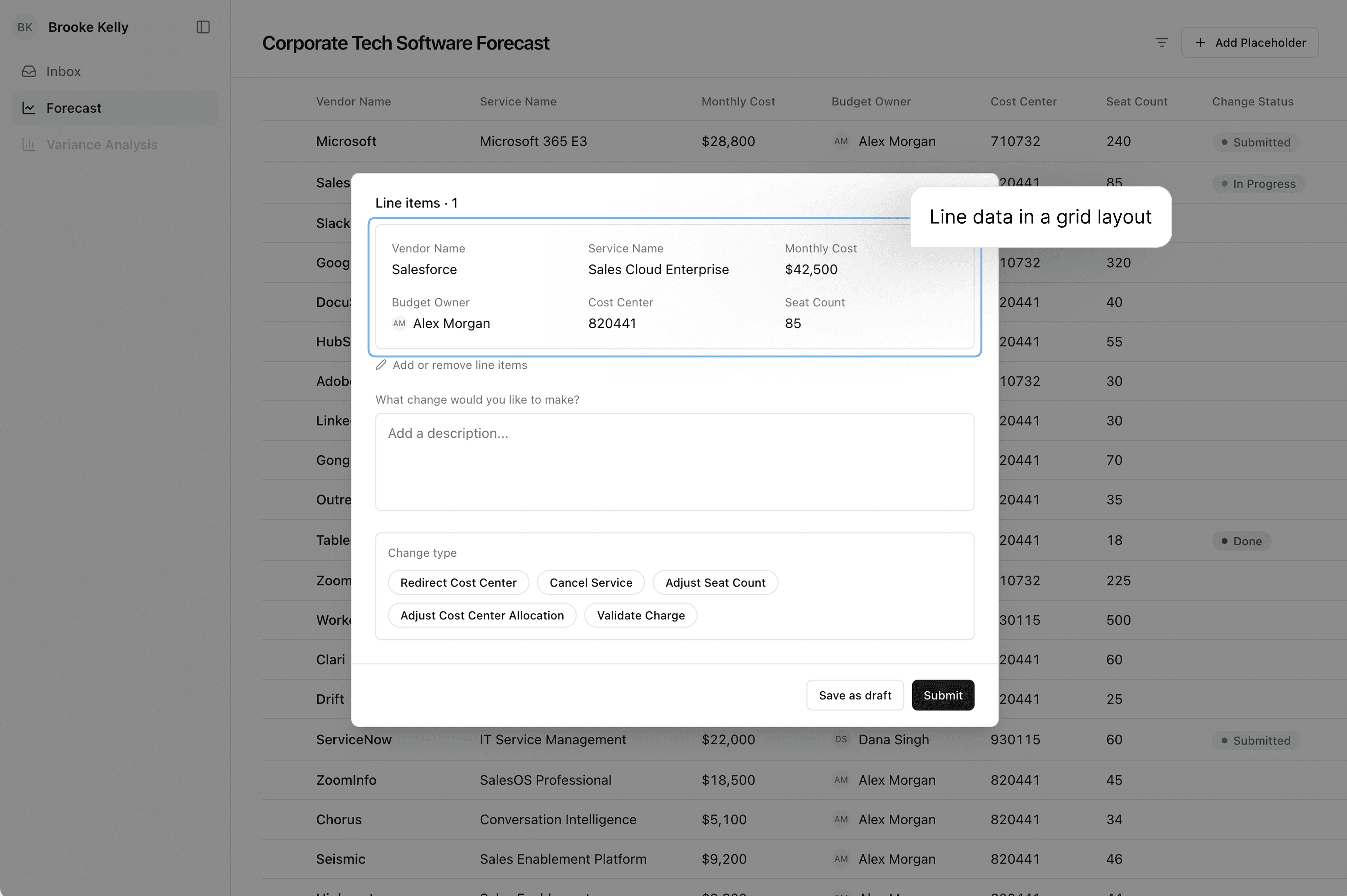
The first version kept everything in the All Items tab: a status column indicates if change requests are 'submitted', 'in progress', or 'done'. The modal used a grid layout.
What we tested | Feedback received |
|---|---|
Status column with pills | Added cognitive load to an already dense view. Too many clicks to see all in-progress change requests in one place. Worked fine for single line item change requests but not for group requests- no way to tell which items belonged together. |
Line item data displayed in a grid layout when the modal is opened | Grid layout worked for one line item, broke down for group requests |

Iteration 2: A separate space for change requests
A dedicated Change Requests tab separated data review from request management. The modal was rebuilt using the same table structure as the main forecast view.
What we tested | Feedback received |
|---|---|
Dedicated Change Requests tab | Separating data review from request management made the data view cleaner and reduced cognitive load |
Table format in the modal | The familiar column structure resolved the group readability issue |
Drafts group added | Gave RMs a place to capture intent before having all the information |


Key debates
Should the change request data live in the React app or upstream?
Engineering reality | The React app reads forecast data from an upstream source but doesn't own it. Change requests need their own database. If a line item is updated upstream after a request is submitted, it could reference outdated data. |
Design adaptation | Line item data in a submitted request is a snapshot taken at submission. On completed requests, a "Data as of [date]" timestamp shows alongside a warning if upstream data changed- original and updated line item side by side, changed field highlighted in amber. |
Resolution | The constraint became a feature- visibility into data drift is now built in. |
Should Relationship Managers be notified every time P&A updates their ticket?
P&A wanted | To work through requests without RMs feeling tracked. Constant notifications create pressure to move faster than the work warrants. |
RMs wanted | Visibility - the old process left them with no indication anything was happening. |
Resolution | No automatic notifications for status changes. Status is always visible passively in the Change Requests tab. The only notification is when P&A sends a message in the in-ticket chat. Communication is the signal, not status movement. |
Final Design

Design decision | What it solves |
|---|---|
Requests tied to line items | Data and requests never separated- no cross-referencing |
Status at every stage | Drafts give RMs a place to hold intent without losing it |
Bulk requests in one action | Select multiple line items, one submission- context always there |
Snapshot + data drift warning | RMs always know what data was used and whether it has changed |
Usability Testing
Task | Result |
|---|---|
Complete a single change request without guidance | All 10 completed in under 2 minutes |
Find a previously submitted request | All 10 identified it correctly |
Discover the bulk request flow | 8 of 10 found it independently after noticing checkboxes |
Edit a submitted request | 2 of 10 looked for a direct edit option - added on unactioned requests |
3 months post-launch
Metric | Target |
|---|---|
RM efficiency rating | Improved from 1 to 3+ out of 5 |
Time saved per RM | ~21 hours saved per forecasting cycle |
What I learned
Do user interviews like a human-to-human conversation, not like a formal interview.The most important question came in the last 10 minutes. For 50 minutes of one interview, I was deep in the details. Then almost as an afterthought, I asked: "Would you rather action changes yourself or have the Planning & Analysis team handle it?" They said: "I think P&A should own the whole thing." That one answer changed the direction of the project. The lesson: build enough trust in the conversation that people tell you what they actually think- talk like a human, not an interview.
Rephrase in really simple words to make sure you get the clearest understanding of what users are saying- You don't have to know the field. Coming into a finance and enterprise context, I worried about missing something because of domain terminology. What I learned is that rephrasing and verifying is more powerful than pretending to follow along. "What I'm hearing is..." or "In plain words — does that sound right?" gave people confidence I understood them, and when I got something wrong, they'd correct me - surfacing nuance I'd have missed.
When a situation feels like a stalemate, listen to each perspective to learn what is fueling their perspective.The ownership debate led to a product decision, not just a design one. My first reaction was: well, someone has to do the logistics. But digging into why Relationship Managers didn't want to do it made something obvious - logistics isn't a people problem, it's exactly what software is built to handle. The reason it felt like a burden was because Anaplan wasn't built for this workflow. Framing it that way led the software forecast team to cancel their Anaplan build and shift to React.